 ginuerzh
d7656ef3de
ginuerzh
d7656ef3de
Covers gost#911 at the wire level: four UDP source sockets send through one
RUDP reverse tunnel bound on a relay server, and every datagram must come
back byte-identical to its own endpoint.

A frame torn by an interleaved writer shows up twice — as a corrupted
payload, and as the torn frame leaving half a header in the stream, which the
far end reads as "unexpected EOF" and answers by rebuilding the whole tunnel.
So the suite asserts both: no endpoint sees a corrupted datagram, and no
endpoint sees a receive gap long enough to be a teardown and rebind.

Verified against a binary built before the fix (4 endpoints, 35% loss, 1.4s
gaps, suite fails) and after it (0% loss, no corruption, 0.2s gaps, passes).
GO Simple Tunnel
A simple security tunnel written in golang


Features
- Listening on multiple ports
- Multi-level forwarding chain
- Rich protocol
- TCP/UDP port forwarding
- Reverse Proxy and Tunnel
- TCP/UDP transparent proxy
- DNS resolver and proxy
- TUN/TAP device and TUN2SOCKS
- Load balancing
- Routing control
- Admission control
- Bandwidth/Rate Limiter
- Plugin System
- Prometheus metrics
- Dynamic configuration
- Web API
- GUI/WebUI
Overview
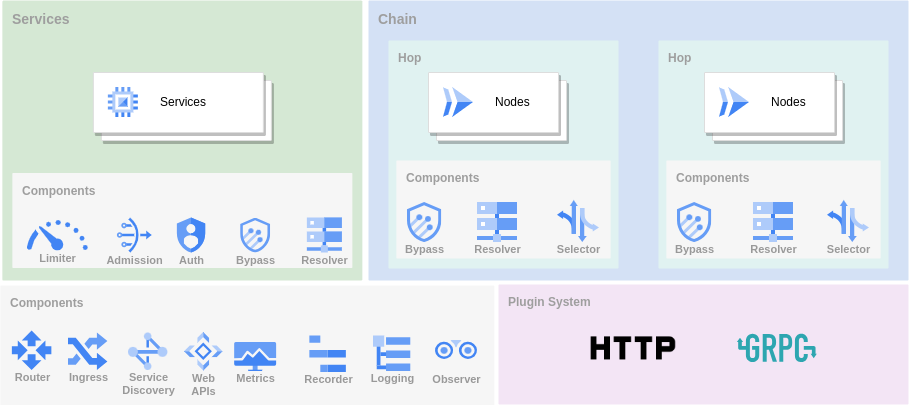
There are three main ways to use GOST as a tunnel.
Proxy
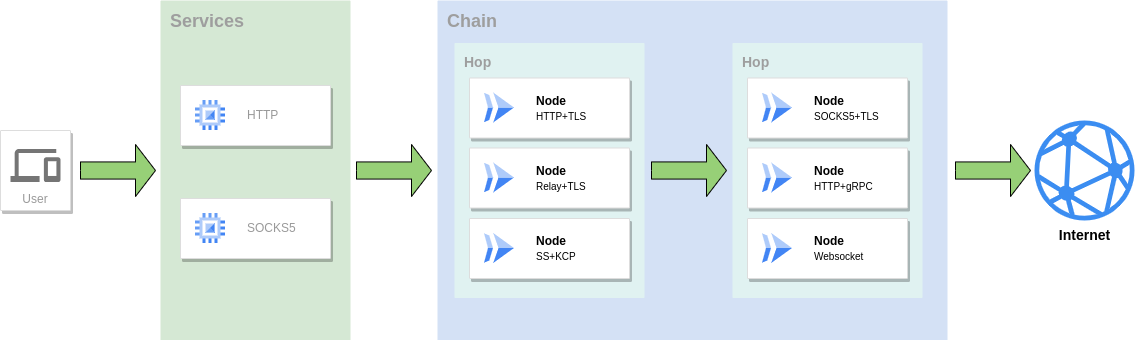
As a proxy service to access the network, multiple protocols can be used in combination to form a forwarding chain for traffic forwarding.
Port Forwarding
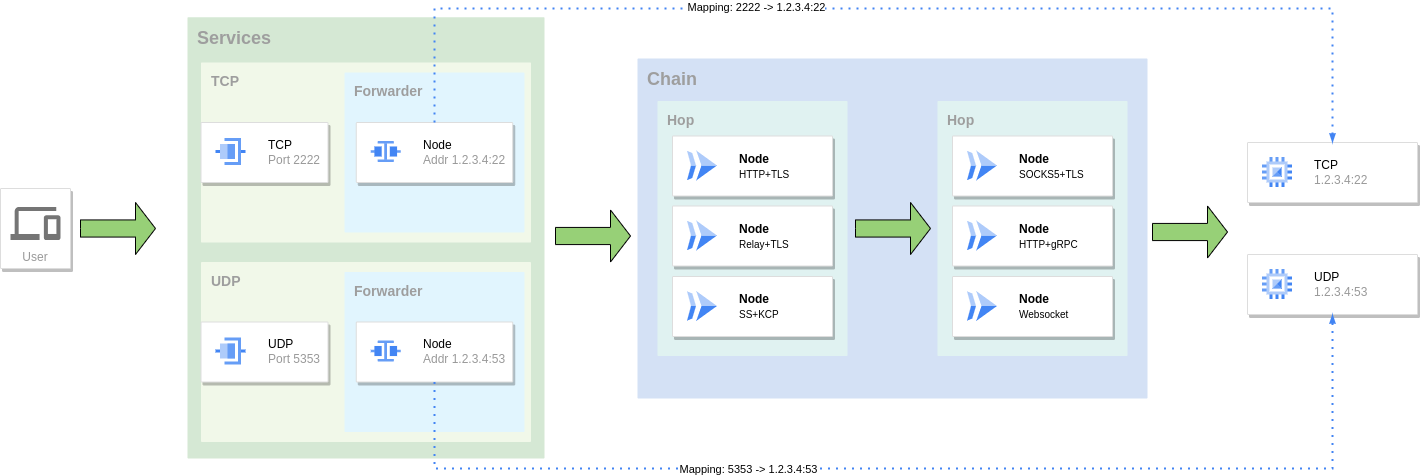
Mapping the port of one service to the port of another service, you can also use a combination of multiple protocols to form a forwarding chain for traffic forwarding.
Reverse Proxy
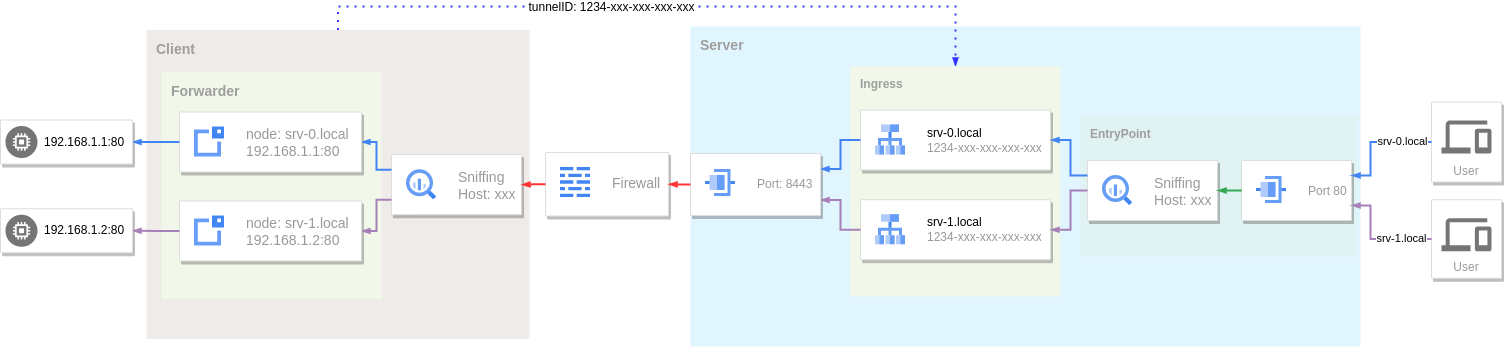
Use tunnel and intranet penetration to expose local services behind NAT or firewall to public network for access.
Installation
Binary files
https://github.com/go-gost/gost/releases
Packages (DEB/RPM)
Download the package for your architecture from the releases page (amd64, amd64v3, arm64):
# Debian/Ubuntu
sudo apt install ./gost_<version>_linux_amd64.deb

# RHEL/Fedora
sudo dnf install ./gost_<version>_linux_amd64.rpm
The amd64v3 package requires an AVX2-capable CPU (x86-64-v3); use amd64 otherwise.
The packages ship a systemd service, but it is not enabled automatically: create /etc/gost/gost.yml first (see /usr/share/doc/gost/examples/gost.yml), then run sudo systemctl enable --now gost. Without a config file the service is skipped rather than failing.
install script
# install latest from [https://github.com/go-gost/gost/releases](https://github.com/go-gost/gost/releases)
bash <(curl -fsSL https://github.com/go-gost/gost/raw/master/install.sh) --install
# select version for install
bash <(curl -fsSL https://github.com/go-gost/gost/raw/master/install.sh)
From source
git clone https://github.com/go-gost/gost.git
cd gost/cmd/gost
go build
Docker
docker run --rm gogost/gost -V
Tools
GUI
WebUI
Shadowsocks Android
hamid-nazari/ShadowsocksGostPlugin
Support
Wiki: https://gost.run
YouTube: https://www.youtube.com/@gost-tunnel
Telegram: https://t.me/gogost
Google group: https://groups.google.com/d/forum/go-gost
Legacy version: v2.gost.run